Keep your assemblies and rates useful
Reuse Item and Task Templates, price options and maintain quote revisions. We help bring your existing estimating method into the setup.

Commercial plumbing, hydraulics & drainage software
Rough-in moves between levels. Fixtures arrive in stages. The drainage route changes. Connect your estimate, approved crew hours, purchasing and claims to each package, so the office and site can plan the work ahead from the same picture.
Book a plumbing project demo →Built around your job breakdown, your crew structure and your claim cycle. Or review how your job information connects ↓
Twenty-five questions on how your business tracks crew hours, materials, fixtures and hire, variations and site conditions, forecasting, and claims, retention and cash. See your score, the practices you already have in place and up to three priorities to work through. Leave your details for the full report and a suggested 30-day plan.
Answer for how your business runs most jobs today. Choose Partly where a process is in place but not yet consistent.
Based on the practices you answered Yes to.
Use your results to guide a team discussion. The full report includes:
Your full report opens immediately after submission. Save or print it for your team. Choose the optional consent below if you would also like practical plumbing cost-control updates.
Read our Privacy Policy for how we collect and use your information. Opens in a new tab.
Preview only. The HubSpot form loads here on contractable.co once Codex sets the form ID.
The commercial pressure behind the programme
A crew returns to a level that wasn’t ready. The fixtures are ordered before the next claim. A drainage route changes after tender. Fit-off, testing and handover still need people.
Each decision belongs to a different part of the job. Review the package detail alongside the whole-project position.
Connect approved hours to the level, zone or task the crew actually worked on.
Keep pipework, fixtures, pumps and subcontract commitments against their allowances.
Follow the builder’s payment breakdown without losing the detail your delivery team needs.
Estimate → Working project budget
Build repeatable estimating templates for familiar scopes. Carry materials, contractor costs and planned labour into the accepted project, organised around how your team will deliver it.
The builder’s claim headings can stay separate from the sections and tasks used to control your costs.
Reuse Item and Task Templates, price options and maintain quote revisions. We help bring your existing estimating method into the setup.
Use task detail for a congested riser or labour-intensive rough-in. Keep a straightforward stage at section level when that answers the commercial question.
Move between task, section or a single cost bucket as priorities change. Detail you never recorded can’t be recovered later.
Crew planning → Mobile time → Approved cost
When plumbers move between floors, stages and projects, a job number alone won’t explain the effort. Contractable connects scheduling and mobile time recording with the work breakdown.
Supervisors review submitted hours before they become actual project cost, using the configured role rate or individual loaded cost. A roster booking remains a plan.
Review the hours already used alongside the effort still needed for fit-off, testing and handover.
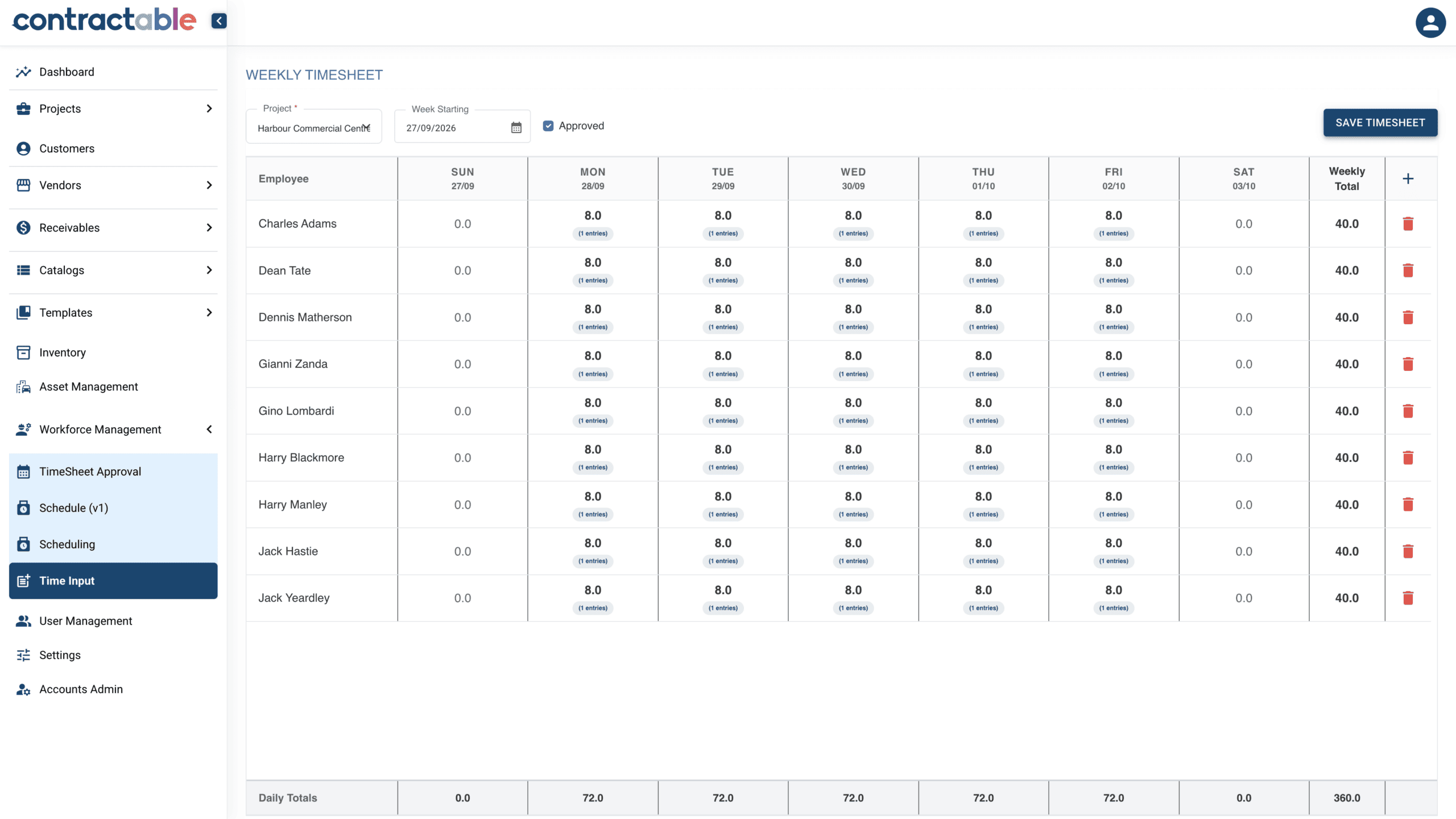
Labour costing is configured with your team. Award interpretation and payroll processing remain part of your agreed payroll workflow.
Supplier enquiry → Order → Receipt → Invoice → Financials
Pipe, fittings, fixtures and pumps are often committed before the supplier invoice reaches accounts. Raise purchase orders against the work they belong to. Use work orders for the subcontract packages you’ve let.
A priced order creates a commitment. As an invoice is recorded against it, that portion becomes actual cost and the unbilled balance remains committed.
Raise supplier enquiries against the budget lines. Compare supplier returns with the allowance before placing the order.
Record receipts, attribute the supplier invoice and review the project cost before the supported transaction posts to financials.
Configure PO and WO documents around your brand, required job details and supplier instructions.
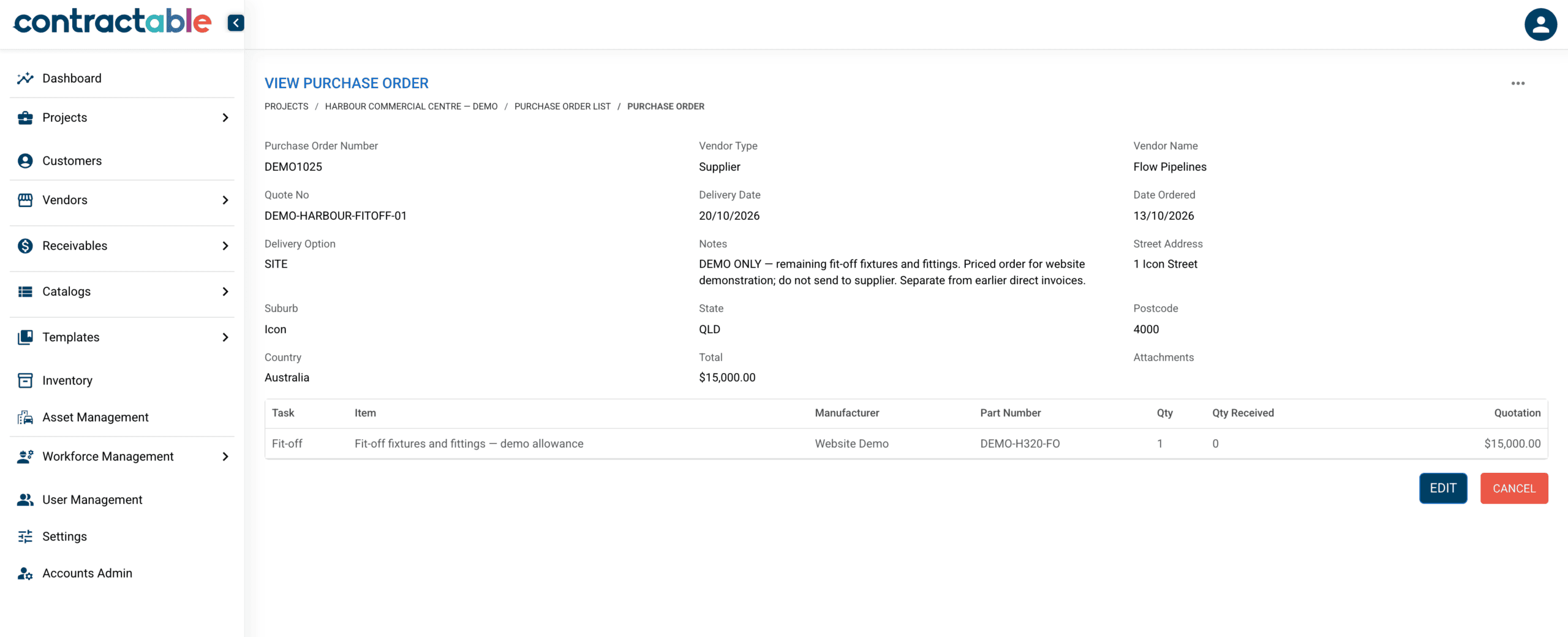
Connect to Xero, MYOB or QuickBooks. We confirm the supported transactions, account mapping and review steps during onboarding. See the accounting workflow →
Changed work → Progress claims → Retention
A redesigned riser, relocated fixture or additional drainage run changes the work you priced. Record and price the extra materials, labour and subcontract scope alongside the original job.
Keep the cost of delivering the change visible as you manage the variation and prepare the next claim.
Separate changed work from the original allowance so the next project review can explain the difference.
Work from the agreed payment breakdown, with previous claims and the remaining amount in view.
Track what the builder holds from you and what you hold from your subcontractors, through completion and the defects period.
The weekly commercial review
Compare approved hours and the current forecast with the original allowance. Keep return visits, testing and close-out work in the conversation.
Review actual cost and the unbilled order commitments separately. Keep remaining uncommitted work in the forecast without counting it twice.
Review changed scope, claim preparation and retention alongside the cost to finish. Assign the investigation to the person who knows the work.
A job total tells you whether margin is moving. The breakdown shows where to investigate.
Implementation for a multi-project operation
Your estimators, project managers, foremen and accounts team need the same structure to mean the same thing. We configure it with you, then train the people who use it.
Use an estimate, a purchasing example and a builder’s claim breakdown to map your sections, tasks, rates and responsibilities.
Check order attribution, time approval, cost review and accounting handover with the people responsible for each step.
Agree access, training and rollout stages. Keep financial visibility appropriate to each role and establish the review rhythm across live projects.
Implementation and training can be online or on site, with scope agreed for your business. Explore setup and support →
Before the demonstration
Yes. Contractable connects estimating, purchasing, approved labour, variations, progress claims and retention for project contractors. For plumbing and hydraulics, the work can be organised by system, level, zone, section and task. The demonstration should follow your actual job structure.
Yes. The work breakdown used to control costs is separate from the payment breakdown agreed with the builder. Your team can review installation packages while preparing progress claims against the agreed claim structure.
No. Track each job at the level it needs: one line, by section, or down to the task. The tracking approach can change during delivery. Detail you never recorded can’t be recovered later.
Site time is submitted against the work and reviewed before approval. Approved hours become actual cost using the configured role-based or individual loaded rate. A scheduled shift is a plan, not an incurred cost.
We work through your existing estimating structure, rates and templates during implementation. Contractable supports Xero, MYOB and QuickBooks integrations; the supported transactions and configuration are confirmed during onboarding.
A representative quote breakdown, the way your crews book time and the builder’s claim headings are useful starting points. You don’t need to send confidential project documents through the public enquiry form; we can arrange a suitable way to review them privately.
From the priced job to the final claim
See how the estimate, crew hours, purchasing and claims connect—using the structure your team needs to run the work. Not ready for a demo? Review how your job information connects.