Set your rates once for each builder
Cost/Sales Levels hold your cost and charge rates. Assign one to a builder and every project for them starts on those rates.

For every trade working under a builder’s schedule: fire protection, formwork and concrete, structural steel, façade, tiling, painting, joinery, scaffolding, demolition and more. Contractable keeps your job broken up the way you deliver it, claims it the way the builder pays, and tracks labour, orders, variations and retention against both. Electrical, plumbing, HVAC and civil have their own pages.
Book a trade contractor demo →Bring a live job, your estimate or the builder’s claim schedule.
Hours run past the allowance on one stage. A supplier invoice lands three weeks after the order. The builder directs extra work on site and the paperwork follows later, if at all. Retention sits with the builder for a year or more, and nobody is watching when it’s due back.
Contractable keeps cost against the work and claims against the builder’s schedule, so you can see which stage is short while you’re still on it.
Every builder wants a different claim break-up. Contractable keeps that payment breakdown on the job without forcing it onto how you run the work, so rough-in, fit-off and testing still carry their own cost.
Cost/Sales Levels hold your cost and charge rates. Assign one to a builder and every project for them starts on those rates.
Track labour-heavy stages task by task and keep simple ones as one line. A job total tells you whether margin is moving; the breakdown shows where to investigate.
Raise progress claims against the builder’s schedule, with previously claimed amounts carried forward and what’s still to claim shown by section.
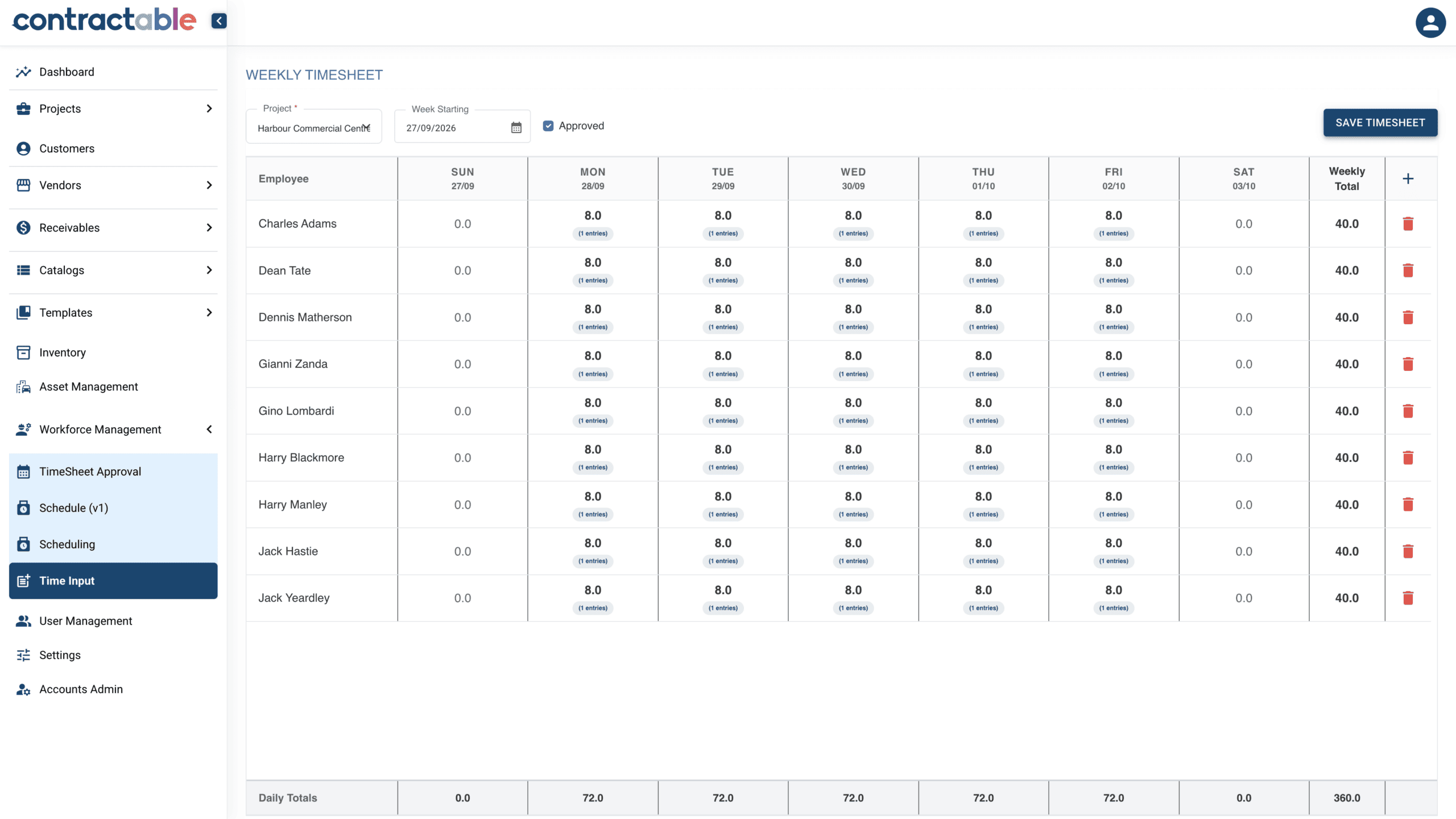
Your team records time in Contractable Mobile against the stage they’re working on. Approved hours flow into project cost at your loaded rates, so you can compare effort with the allowance while the job is running.
A booking is a plan. Only approved hours become cost against the job, so the budget only carries time someone has signed off.
Cost the hour at a role rate or at each person’s own loaded cost, with overtime and unpaid breaks handled in the costing rather than by hand.
Labour-hire and subcontract labour are costed against the task the same way as your own crew.
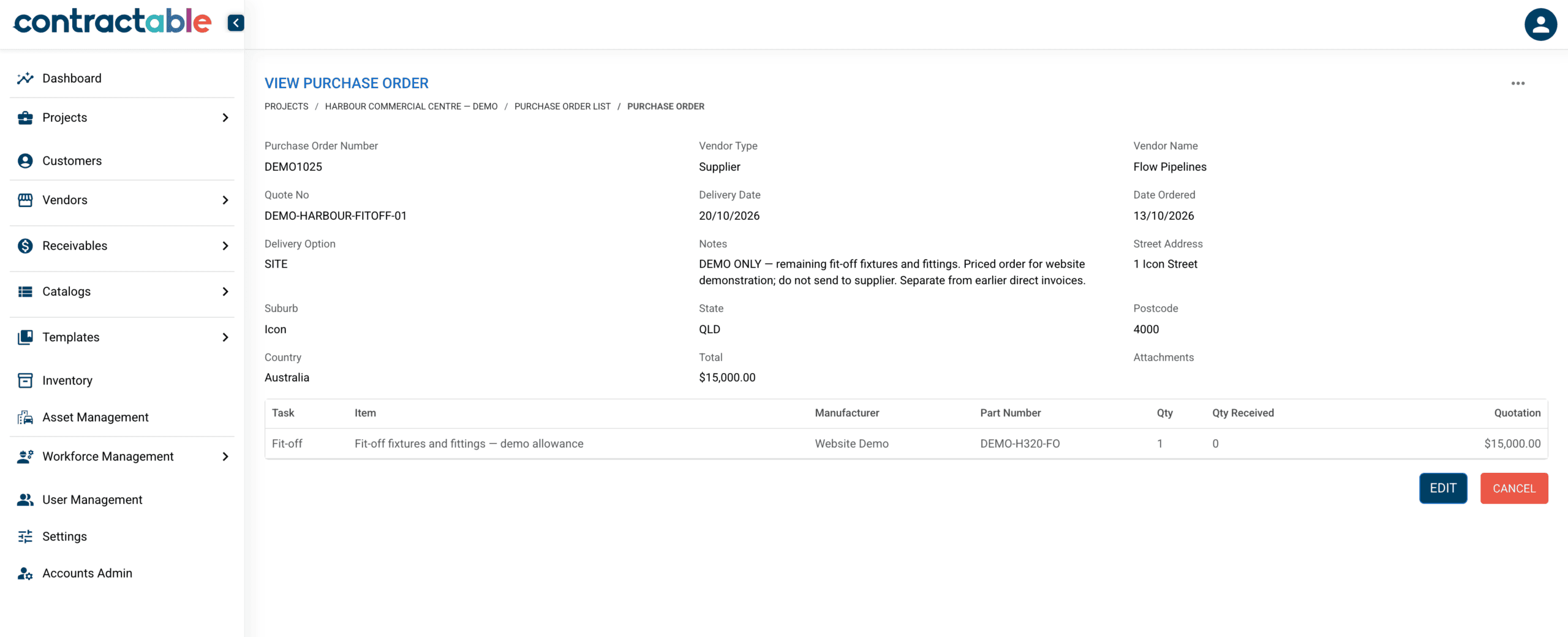
Order materials against the task they’re for. A priced order is committed straight away, so a late supplier invoice can’t hide what the stage has already spent. Deliveries are receipted against the order, with the docket photo attached. When the invoice is recorded against the order, that portion becomes actual cost and the unbilled balance stays committed.
Price and record the variation when the builder directs the change, against the work it affects, so the extra labour and material are visible instead of absorbed into the original allowance.
Track what each builder holds, and when it’s due back, through practical completion and the defects liability period. Releases are scheduled in tranches.
If you let work to your own subcontractors, track the retention you hold from them in the same place.
Connect purchasing, receipts and invoice attribution to your project budget, then the accounting workflow. Contractable supports integrations with Xero, MYOB and QuickBooks; we confirm the supported transactions and your setup during onboarding.
Invoice capture, extraction and mapping are rolling out to accounts as they onboard. Ask to see the workflow in your consultation.
Explore accounting integration →A login isn’t an implementation. We work through how you estimate, order and claim, then help the team use it on a real job.
Bring an estimate, a builder’s claim schedule and the way you break up a job. We identify the cost centres, roles and approvals you need.
Agree templates, rates per builder, purchasing documents and the accounting connection.
Work through a job with the people estimating, ordering, recording hours and claiming. Review the setup as the team starts using it.
Yes. Each job carries its own payment breakdown, set up to match that builder’s schedule, while your cost breakdown stays the way you run the work.
This page is about commercial project delivery: estimating, purchasing, labour cost, variations, claims and retention. If you also run maintenance and call-outs, we can talk through how project control sits alongside your service workflow.
No. Track each job at the level it needs: one line, by section, or down to the task. You can change the approach as the job runs, though detail you never recorded can’t be recovered later.
An estimate, an example purchase order and the builder’s claim schedule for a live job. We’ll walk through how they connect to one working budget.
Comparing systems? Use the buyer’s guide scorecard — seven demo tests and a whole-of-cost scorecard for comparing construction cost management software.
See how your estimate, orders, site hours and claims could work together, and what it would take to get your team set up.