
Crew scheduling and timesheets,
with the cost attached.
Allocate crews across concurrent jobs, capture hours on site, and have every hour land on the task it was spent on — costed three ways.
One project up to AU$1,000,000, with up to 25 tasks and subtasks, unlimited office users and three Mobile users. Full platform. No expiry — free until you start a second project. Consultation first, then we configure the account around your job.
A booking is not a cost
Scheduling someone onto a task next week doesn’t touch the budget. A forward booking is a plan, and plans change — crews get pulled, weather intervenes, a slab isn’t ready.
An hour becomes cost only once it has been worked, submitted by the person who worked it, and approved by management. Three states, in that order, and the budget moves at the third.
That gate is why the actuals are worth reading. A system that costs the roster tells you what you meant to spend. This tells you what you spent.
Against the task, not the job
Who’s where
Crews and individuals allocated across concurrent projects, visible to the office and to the field. Move someone and both sides know.
Captured on site
Off the phone, against the specific task consumed. A day split across three tasks is three entries.
Three ways to cost an hour
Basic payroll cost, fully loaded cost, and contractor cost — attributed the same way. Budget attribution runs at the fully loaded rate.
Budget hours against actual
Every task carries the effort it was estimated at and the effort it took, with the percentage between them, while the job is still running.
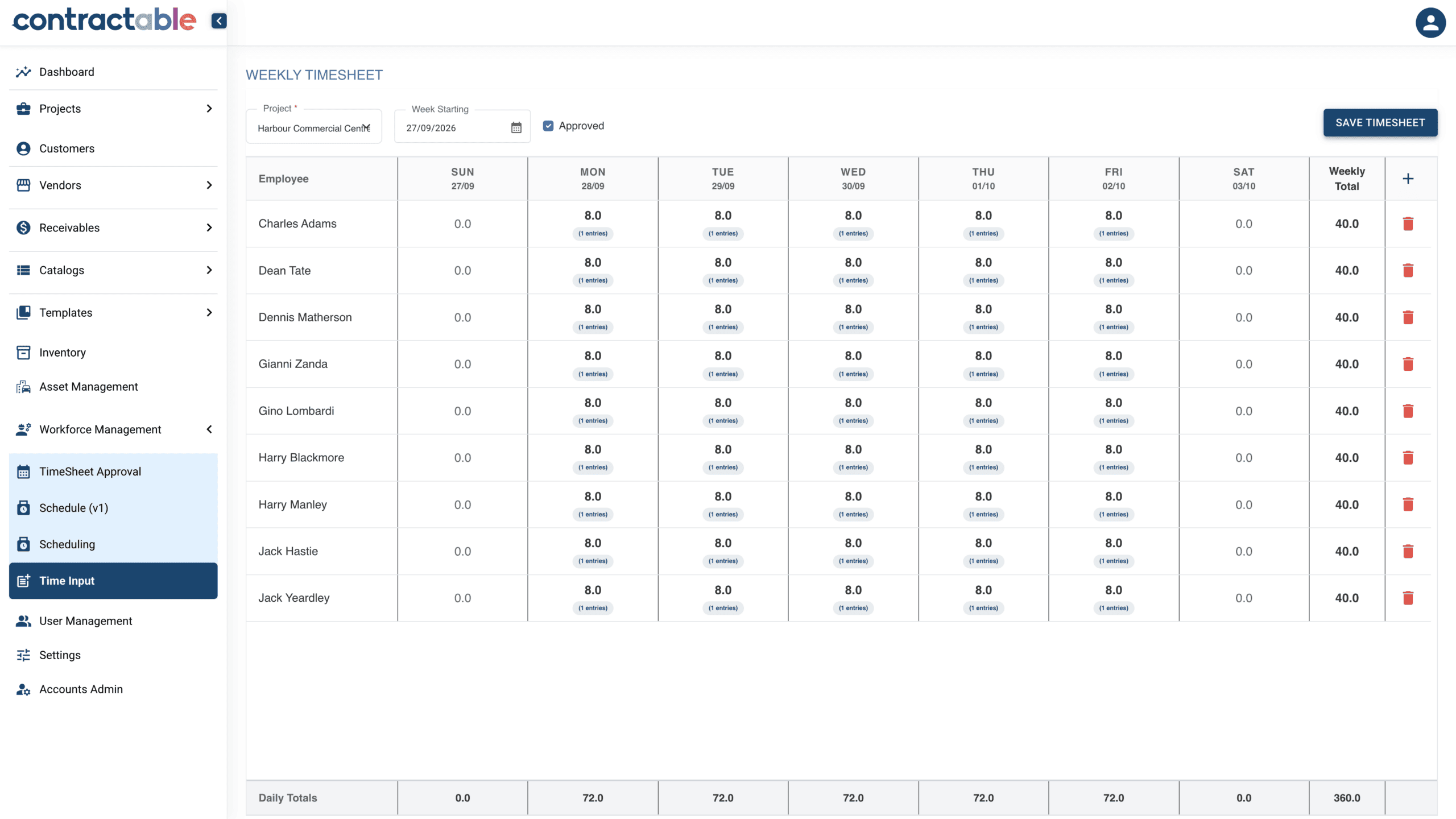
Check the agency invoice against the hours behind it.
Give labour-hire workers access to Contractable to receive work tasks and record their time against them. Use basic payroll reporting to support reconciliation of the labour-hire agency’s weekly invoice.
For the site and project team
Allocate the work and capture the hours against the tasks actually worked. When the day changes, the record can reflect where the effort went.
For the office and finance team
Use the recorded hours and basic payroll report as the basis for checking the agency’s weekly invoice. Investigate differences with the project context available, rather than relying on an invoice total alone.
Can labour-hire workers use the app?
Yes. Labour-hire team members can receive work tasks and submit timesheets through Contractable. Worked hours become actual labour cost only after submission and management approval; recording or scheduling a shift is not that approval.
Here is a Tuesday
A foreman works nine and a half hours on in-slab stormwater. Ordinary day, nothing went wrong, nobody made a mistake.
The job was tendered at one labour rate. One number, every hour, whoever works them. Most jobs are priced exactly that way. Then Tuesday gets a foreman.
| Jacob Nielsen · Foreman LVL 1 · ground / inground stormwater — Tuesday, 9.5 worked hours | |
|---|---|
| 8 h at 1.0× × $168.00 | $1,344.00 |
| 1.5 h at 1.5× × $168.00 | $378.00 |
| The day | $1,722.00 |
| ÷ 9.5 worked hours | $181.26 |
| Tendered rate | $146.43 |
| The gap | $34.83 an hour |
Illustrative project. Demonstration data.
$34.83 an hour, and it splits in two
$21.57 of it was decided at tender. The job was priced at $146.43 an hour — one blended rate, every hour, whoever works them. Tuesday got a foreman who loads out at $168.00.
$13.26 of it happened on Tuesday, when the day ran an hour and a half long.
One of those you fix on the next job you price. The other you can only see while this one is still running.
“Jacob — 47.5 hours”
On a paper docket or a payroll export, that Tuesday arrives at the end of the week inside a single number. Forty-seven and a half hours, costed at an average rate, landed against the job rather than the task.
Same hours. Same money out the door. No information.
You cannot tell which task consumed them, you cannot tell what the overtime cost, and you cannot tell whether in-slab stormwater is running hot — because in-slab stormwater is not a thing the number knows about.
Worked, submitted, approved
Recorded
On the phone, on site, against the task from today’s list. Where the office scheduled the shift with its task and its hours, the person confirms it; where the day changed, they amend it first. A day split across three tasks is three entries.
Submitted
By the person who worked the hours. Their name is on it.
Approved
By management. Until this happens the hours are not cost.
Costed
Worked hours become actual cost only after submission and management approval, at the configured loaded rate.
Laddered
The configured overtime ladder applies per person, per day. In this illustrative example: ordinary time to eight hours, time and a half to ten, double beyond.
Attributed
Onto the task’s budget line, against what that task was allowed. The variance updates in the same movement.
The field team records and submits. Management approves. The platform applies the configured costing and attribution.
Start with the schedule. Record the day that happened.
Where the office has scheduled the work, the shift is already on the phone carrying the project, the task and the hours. The person who worked it checks the entry, updates what changed, then confirms and submits it for review.
When the day did not go to plan, they amend it instead — change the task, change the hours, add a second entry for work that ran past the shift — then confirm. The running total is what tells them the day adds up before it leaves their hands.
The standard day is configured — and the unpaid break comes out by itself
A shift’s clocked span is split into ordinary hours, the configured unpaid portion and any overtime. The unpaid portion is held back from attributing to the budget. Nobody deducts a break by hand, on site or in the office.
The office approves a week in one pass
Submitted shifts queue up with that split shown against the clocked span, so approving is reading a breakdown rather than rebuilding a day. Approve them together; open the exceptions one at a time to amend or reject.
This is what makes the gate affordable. An approval step that takes a fortnight to get through is a step that gets skipped, and a job whose cost is wrong on every screen until someone catches up.
The gap between what that Tuesday was tendered at and what it actually cost, per hour, on one ordinary day with nothing going wrong.
Illustrative project. Demonstration data. $181.26 effective against $146.43 tendered.
What it doesn’t do
Contractable does not interpret enterprise agreements or modern awards. Payroll cost here is the direct cost of the hour. If your payroll runs under an EBA with award interpretation, that stays where it is — this is about what the work cost you, not what the pay run owes.
What gets asked on site
“We already do timesheets.”
Most people do. The question is whether the hours land on a task with a budget behind it, or in a weekly total that only payroll can use.
“Will the crews actually use it?”
It has to be quicker than the docket book or it won’t get used. Crews see the jobs they’re on and record against them.
Put one crew on one job and watch where the hours land.
One project up to AU$1,000,000, with up to 25 tasks and subtasks, unlimited office users and three Mobile users. Full platform. No expiry — free until you start a second project. Consultation first, then we configure the account around your job.